How to Calculate Vehicle Speed From Video: A Step-by-Step Guide
To calculate vehicle speed from video, you need two measurements: the real-world distance a vehicle travels and the time it takes to cover that distance. Divide distance by time, then convert the result into km/h or mph. A phone camera and the AI Traffic Count app can automate the difficult part by detecting vehicles, tracking them between two virtual measurement gates, and calculating an estimated speed.
This guide explains the complete workflow—from choosing a camera position to checking the results—and shows how to avoid the setup mistakes that have the greatest effect on accuracy. You can use it for traffic observations, before-and-after studies, neighborhood road-safety projects, driveway monitoring, or general traffic research.
The Vehicle Speed Formula
The basic calculation is simple:
Speed = distance ÷ time
If distance is measured in meters and time in seconds, the result is meters per second. Use either of these conversions:
- Speed in km/h = distance in meters ÷ time in seconds × 3.6
- Speed in mph = distance in meters ÷ time in seconds × 2.23694
For example, a vehicle that travels 10 meters in 1.25 seconds is moving at 8 meters per second. That equals 28.8 km/h or approximately 17.9 mph.
The formula is not the difficult part. Reliable results depend on identifying the same point on the vehicle at both measurement gates, measuring the real road distance correctly, and determining the elapsed time from the video frames. AI-based tracking makes those timing and detection tasks much faster.
A Stable Video
Keep the camera stationary while vehicles pass through the measurement area.
A Known Distance
Measure the real road distance between two clearly visible reference points.
Accurate Timing
Use the video frames to determine how long each vehicle takes to cross the distance.
Consistent Tracking
Follow the same vehicle between both virtual measurement gates.
How to Calculate Vehicle Speed From Video With AI Traffic Count
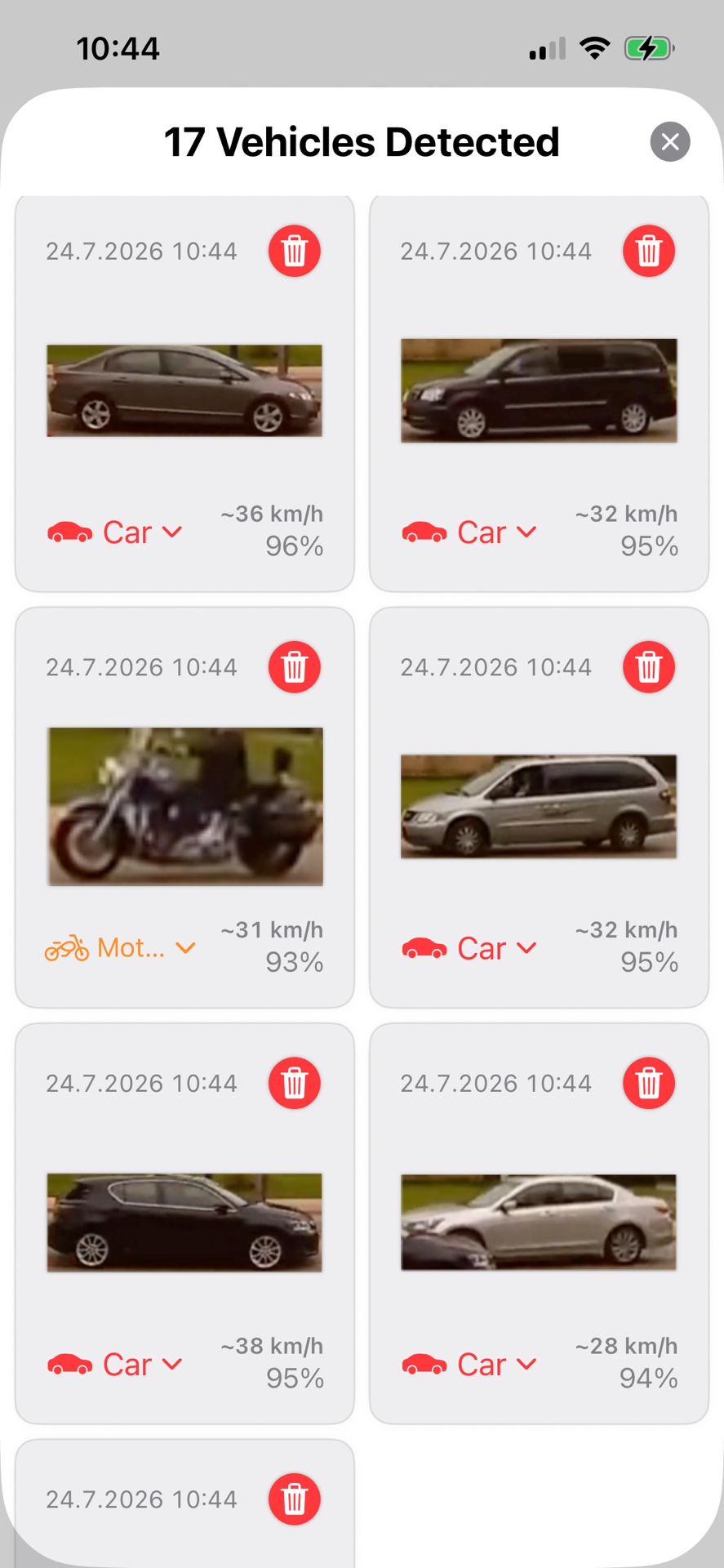
Step 1: Record a Clear, Stable View of the Road
Place your iPhone or iPad on a stable support and frame the section of road you want to measure. The vehicle must remain visible before it reaches the first measurement gate and until it has passed the second.
For the best results:
- Keep the camera fixed; do not pan or zoom during recording.
- Choose a location where vehicles are not hidden by trees, parked cars, signs, or pedestrians.
- Record in good daylight when possible.
- Avoid shooting directly toward bright sunlight or strong reflections.
- Leave enough road visible to create a useful distance between the two gates.
A side or elevated diagonal view is generally easier to work with than a head-on view. The road surface around both gates should be visible so that you can measure their real-world separation.
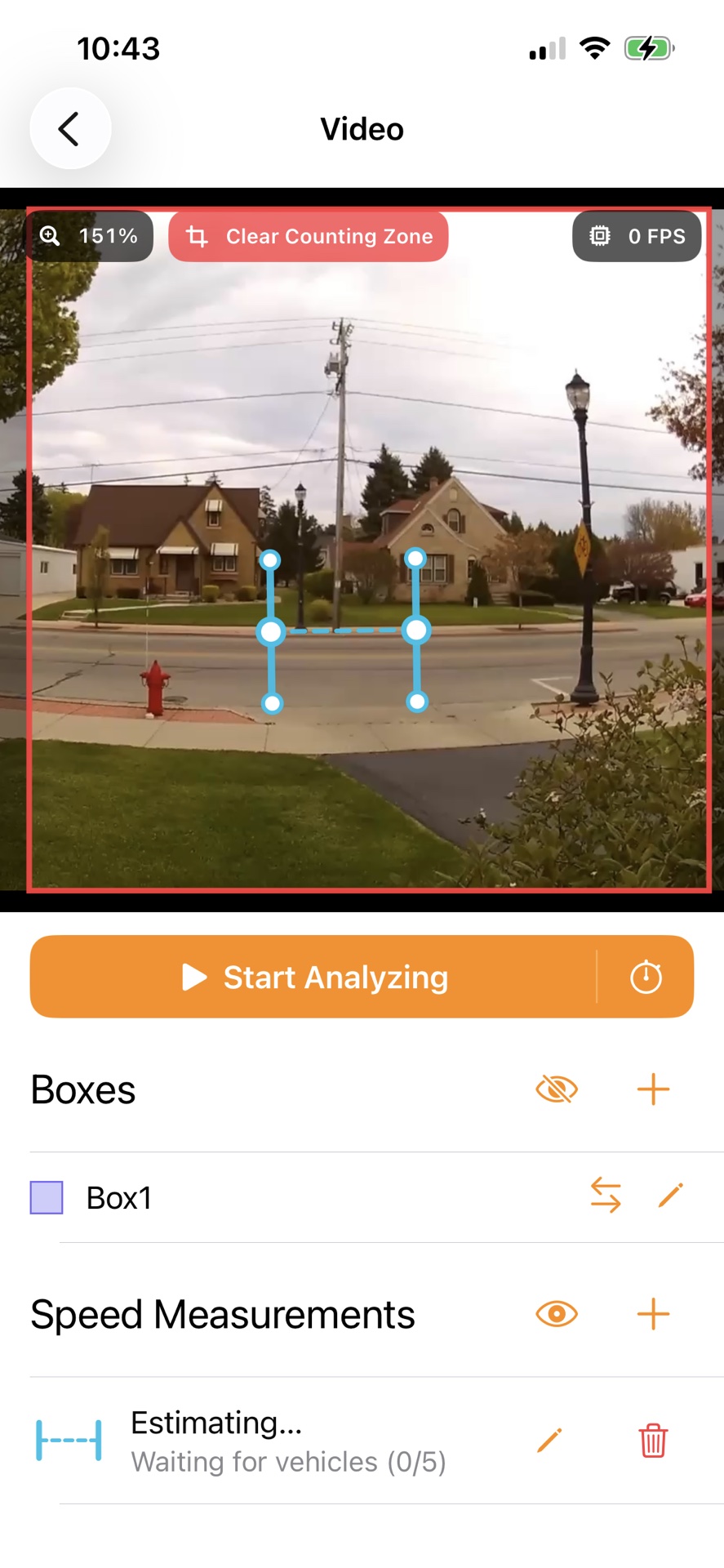
Step 2: Position the Two Measurement Gates
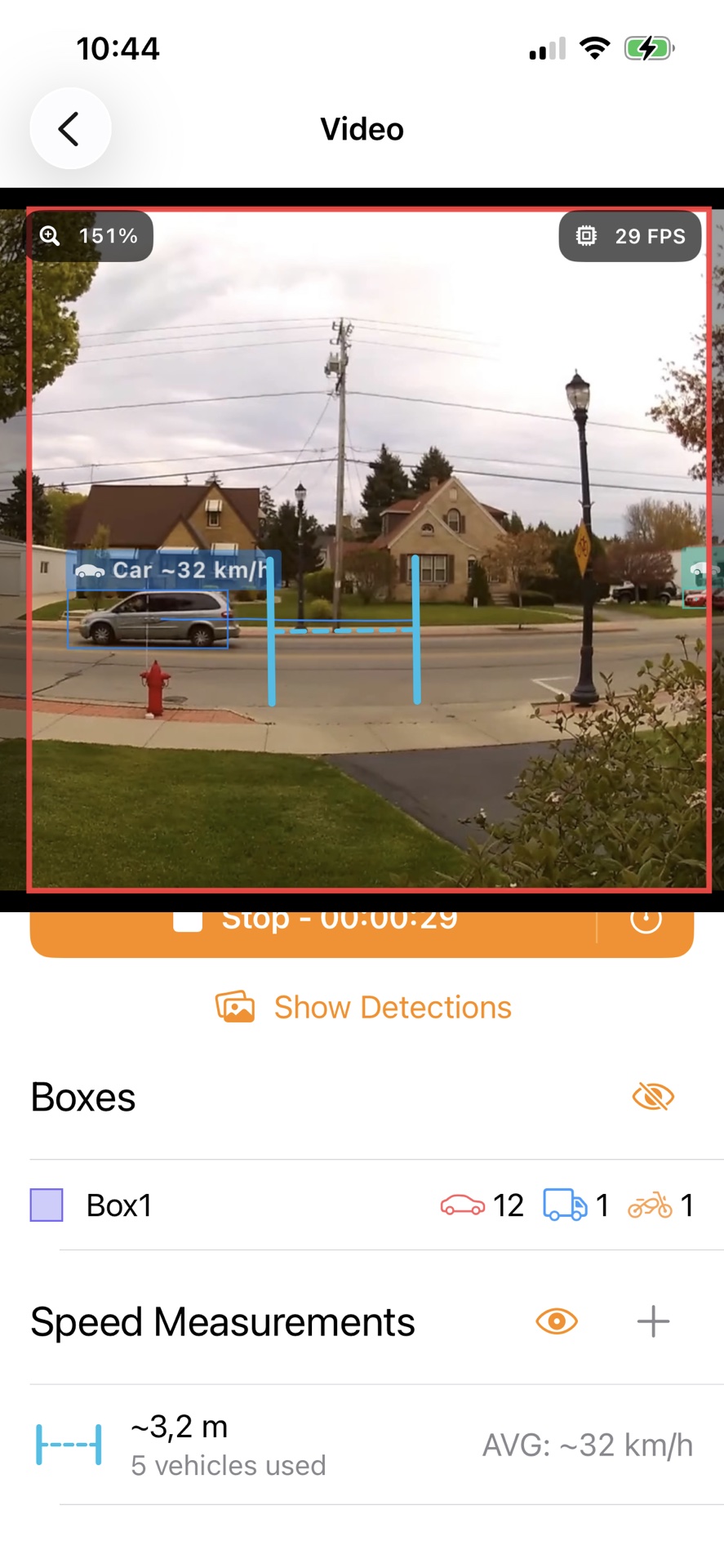
Open the recording in AI Traffic Count and place the two blue measurement gates across the vehicle’s path. Each gate represents a point the tracked vehicle must cross.
Position the bottom of both gates on the same part of the road surface that you will measure in the real world. Keep the gates approximately perpendicular to the direction of travel and make sure every relevant vehicle crosses both of them. Drag the control points to adjust their position and height.
Do not place one gate much closer to the camera than the other unless the road distance and perspective are easy to verify. A clean, unobstructed section of a single lane normally produces the most consistent results.
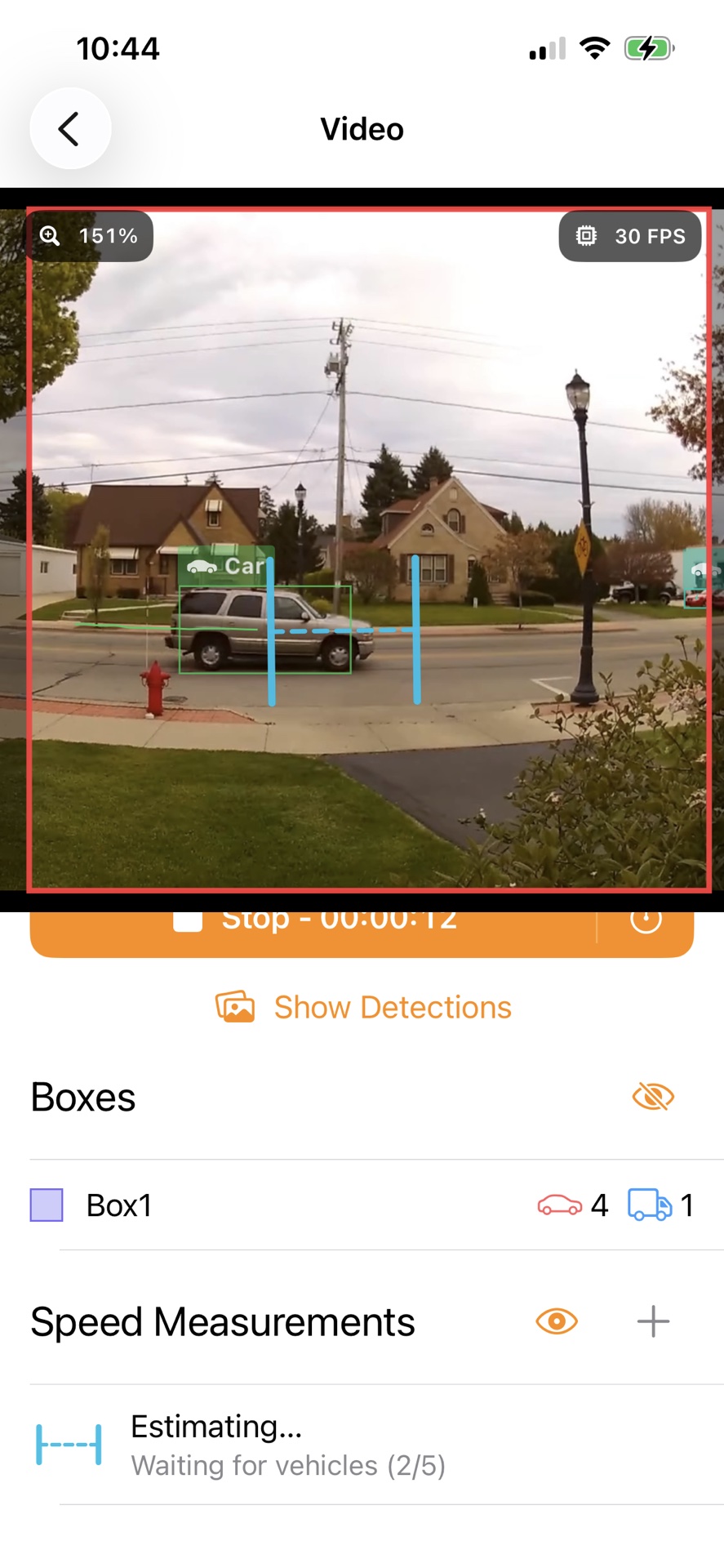
Step 3: Start the Video Analysis
Tap Start Analyzing. The app detects vehicles and tracks their movement through the measurement area. During this first analysis, the app can estimate the relationship between the two gates and prepare the speed calculation.
Watch several vehicles pass through both gates. Check that the detection box follows each vehicle and that the vehicle is not lost or confused with another road user. If tracking is unreliable, stop and improve the setup before collecting a longer session. Moving a gate away from an obstruction or choosing a clearer recording can make a large difference.
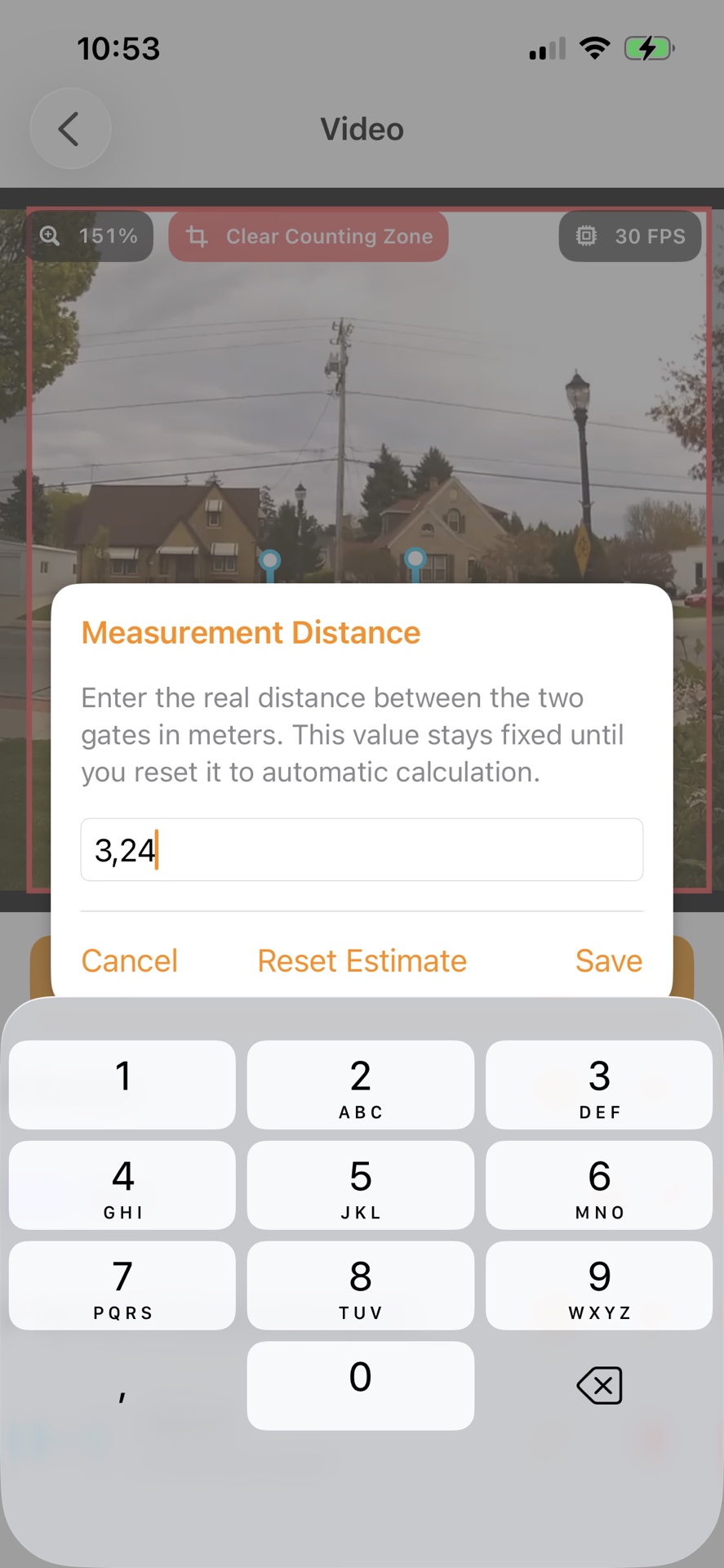
Step 4: Enter the Real Distance Between the Gates
Measure the distance on the road between the two gate positions and enter it in meters. Use a tape measure, measuring wheel, a reliably surveyed feature, or another method suitable for the site. Measure along the path vehicles actually travel—not the straight line from the camera to the road.
Enter the value in the Measurement Distance dialog and tap Save. The distance remains fixed until you reset it, allowing the app to convert each vehicle’s travel time into an estimated real-world speed.
Be precise. If the true distance is 10 meters but you enter 11 meters, the calculated speed will also be about 10% too high. A longer measurement zone can reduce the relative effect of small placement and timing errors, provided vehicles remain clearly visible throughout it.
Step 5: Review the Estimated Vehicle Speed
Once the setup is ready, the app displays an estimated speed as a tracked vehicle crosses the measurement area. Review multiple vehicles rather than relying on a single result. Consistent readings under similar conditions are more useful than an isolated measurement.
If a result appears unrealistic, check the detection, the distance value, and whether the vehicle crossed both gates normally. Turning vehicles, lane changes, braking, acceleration, partial occlusion, or an incorrect video frame rate can all produce outliers. Repeat the recording or adjust the gate positions when necessary.
How Video-Based Vehicle Speed Estimation Works
A video is a sequence of frames with known timing. A speed-estimation system detects a vehicle in one frame, associates it with the same vehicle in later frames, and determines when it crosses each measurement gate. The time between those crossings becomes the time part of the speed formula; your measured gate separation supplies the distance.
This approach combines object detection, multi-object tracking, frame timing, and a conversion between image coordinates and the real road. Technical implementations may use a real-world scale such as meters per pixel or calibrated road coordinates. Together, these measurements allow the system to translate movement across video frames into an estimated real-world speed.
Research into monocular-camera speed measurement emphasizes that converting positions in a two-dimensional image into real-world coordinates is one of the central challenges. A practical alternative uses two virtual lines with a measured real distance between them—the same basic distance-over-time principle used in this guide. See the open-access Scientific Reports study on monocular vehicle speed measurement for a more technical explanation.
How to Improve Speed-Estimation Accuracy
No ordinary camera setup should be assumed to produce perfect measurements. Treat the result as an estimate and improve repeatability with a controlled setup.
- Stabilize the camera. Even small movements change the apparent position of the gates and vehicles.
- Measure on the road plane. The entered distance must follow the vehicle’s actual route between the gates.
- Use a longer practical distance. Very short distances magnify small timing and placement errors.
- Keep both gates in a similar depth range. Extreme perspective makes image-to-road conversion more sensitive.
- Use adequate resolution and frame rate. More clear frames around each crossing give the tracker more information.
- Avoid occlusion. Do not let parked vehicles, vegetation, poles, or other traffic hide the measurement zone.
- Test with a known reference. If possible, record a vehicle traveling at a verified steady speed and compare the estimate.
- Repeat the measurement. Look for consistent patterns across several passes and investigate obvious outliers.
Resolution, frame rate, tracking quality, environmental conditions, perspective, and camera specifications can all influence the result. Validation against known reference data is the best way to understand the margin of error for your particular setup.
Manual Calculation vs. Automatic AI Estimation
You can calculate speed manually by choosing two visible road points, counting the frames between crossings, dividing the frame count by the video frame rate, and applying the distance-over-time formula. This can work for one vehicle, but it becomes slow and inconsistent when many vehicles must be reviewed.
AI-assisted analysis automates vehicle detection, tracking, crossing-time measurement, and repeated calculations. That makes it more practical for traffic observations where the goal is to understand patterns across many vehicles. It can also preserve individual detections so you can review questionable results instead of relying only on an overall average.
Important Limitations and Responsible Use
Video-based results are speed estimates, not automatically certified enforcement measurements. Do not use them to accuse an identifiable driver, issue penalties, or claim legal proof unless your local authority and an appropriately qualified expert confirm that the complete method, equipment, calibration, and evidence handling meet the applicable requirements.
Respect privacy and recording laws. Requirements differ by country and location, especially when filming public roads, neighboring property, people, or license plates. Record only where you are permitted to do so, minimize unnecessary personal data, and share aggregated traffic findings whenever individual evidence is not needed.
Frequently Asked Questions
Can I calculate vehicle speed from any video?
Not reliably. The video should have stable timing, a stationary viewpoint, a visible road section, and enough information to determine a real-world distance. A moving camera, edited playback speed, missing frames, severe perspective, or unknown frame timing can make a useful calculation impossible.
How far apart should the measurement gates be?
There is no single ideal distance for every road. Use the longest practical distance over which vehicles remain clearly visible and normally maintain their lane. Avoid distances so short that a one-frame timing difference would substantially change the result.
Can a phone camera replace a radar gun?
A phone camera can provide useful estimated speeds for observation, screening, and traffic studies, but it should not automatically be treated as a replacement for a calibrated or legally approved radar, lidar, or enforcement system. The appropriate tool depends on the accuracy and evidentiary requirements of the project.
Can I use an existing CCTV or security-camera recording?
Potentially, if the camera was stationary, the original frame timing is intact, the vehicle crosses two visible reference points, and you can measure the real distance between them. Compressed, variable-frame-rate, time-lapse, or exported footage may require extra verification.
Start Measuring Traffic With Your iPhone
AI Traffic Count turns an iPhone or iPad into a practical traffic-analysis tool. Use it to count vehicles, review detections, and estimate speeds from a carefully measured video setup—without installing permanent roadside hardware.
For a broader introduction, read how the app automatically counts vehicles in video. If you are evaluating a road-safety intervention, you can also learn how to track the effect of traffic-calming measures.